Bug Hunter
EngineeringReads code looking for subtle bugs, race conditions, edge cases.
code review quality
Drop-in replacement for the OpenAI SDK — same code, zero cloud. A native Mac app with chat, 22 agents, persistent memory, and a local server your whole team can hit. No subscription. No leaks. No IT ticket.
Free to try · Lock in $29 Early Bird (first 500) instead of $49 · No subscription · 30-day refund
Scroll through. Every pixel runs on your Mac.
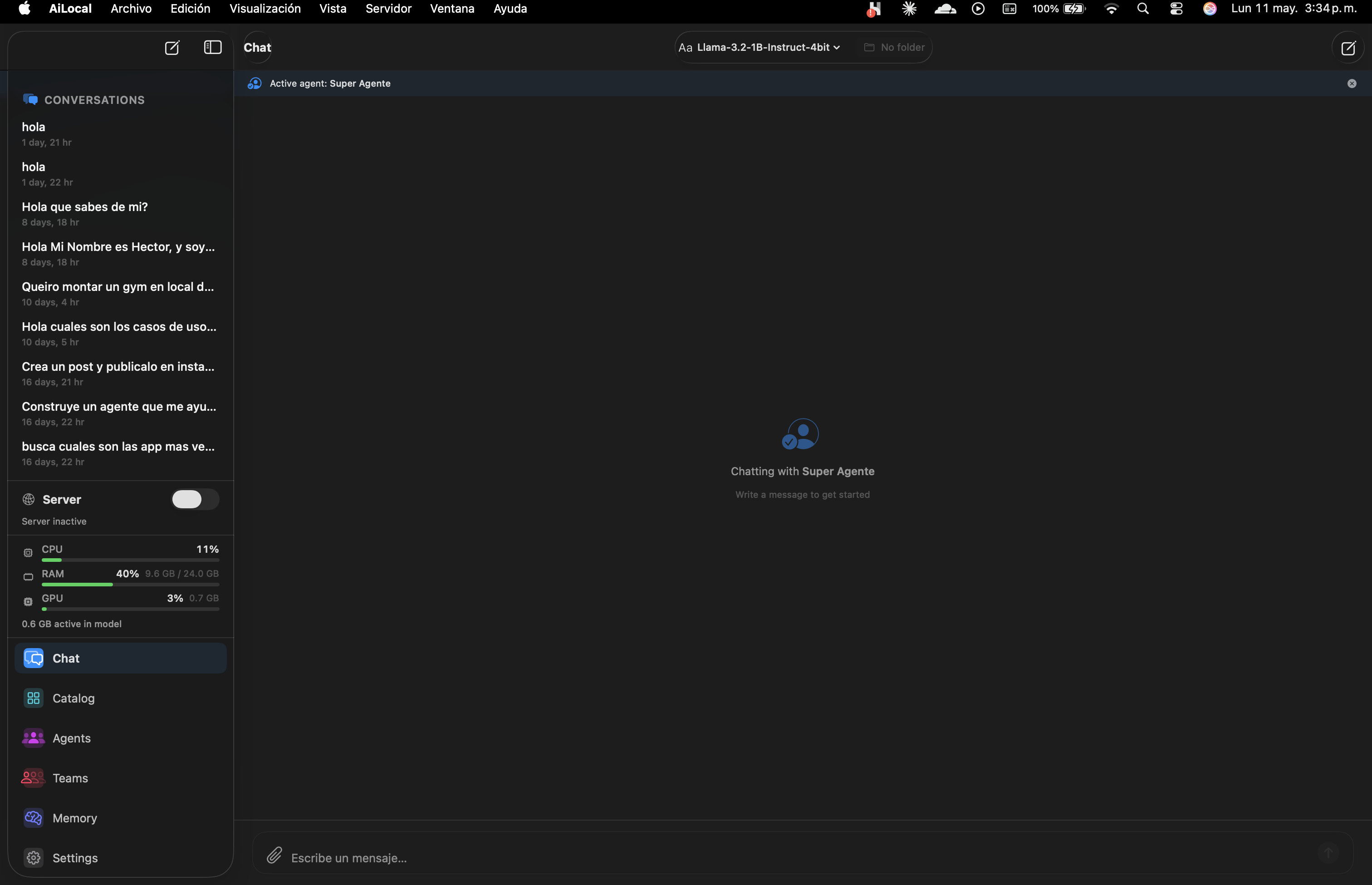
A clean native chat with conversation history, active-agent indicator, and instant model switching. Every word stays on your Mac.
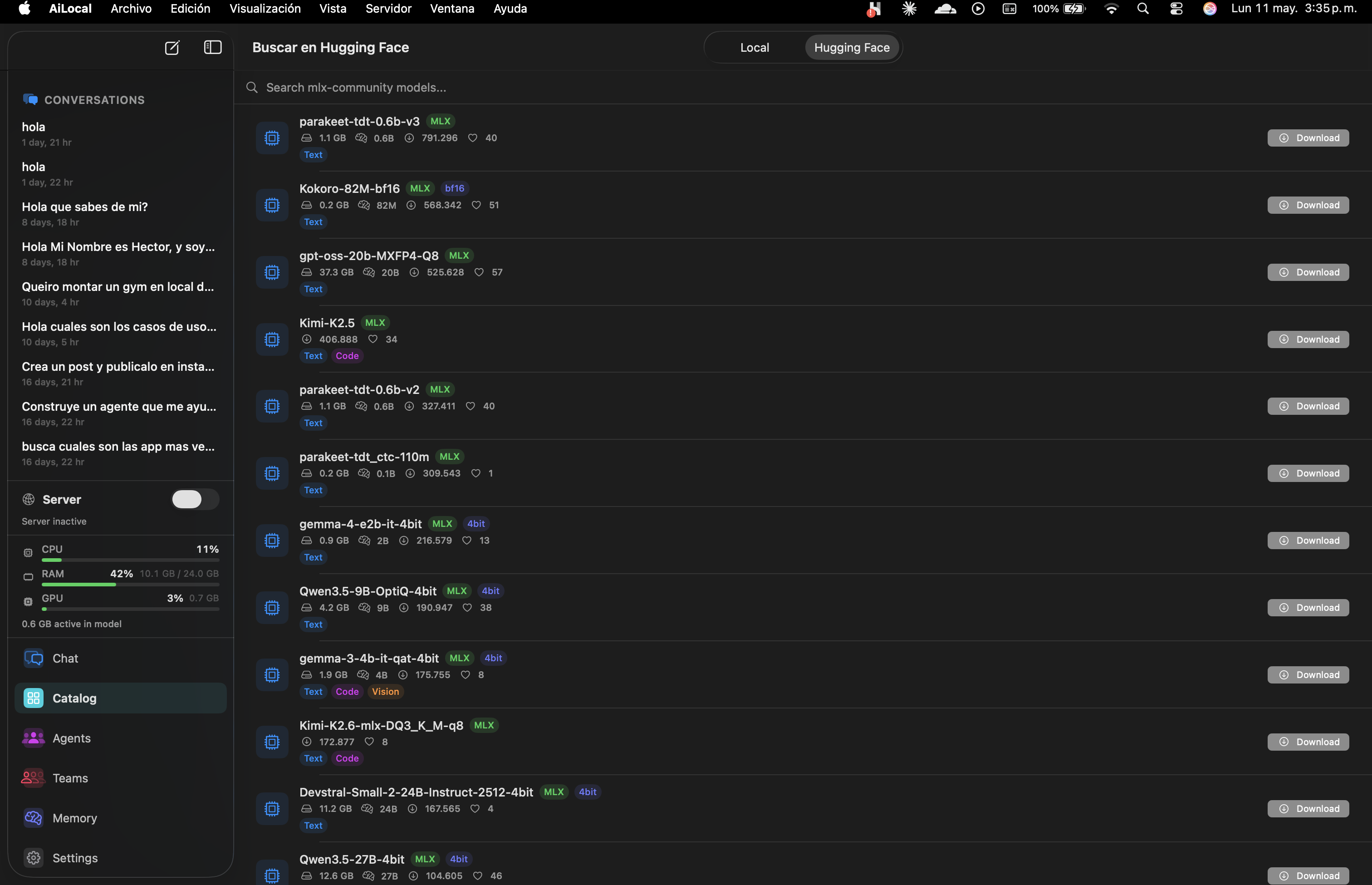
Browse local quantized models or search HuggingFace Hub directly. Download Llama, Qwen, Gemma, Mistral, Phi — all MLX-optimized for Apple Silicon.
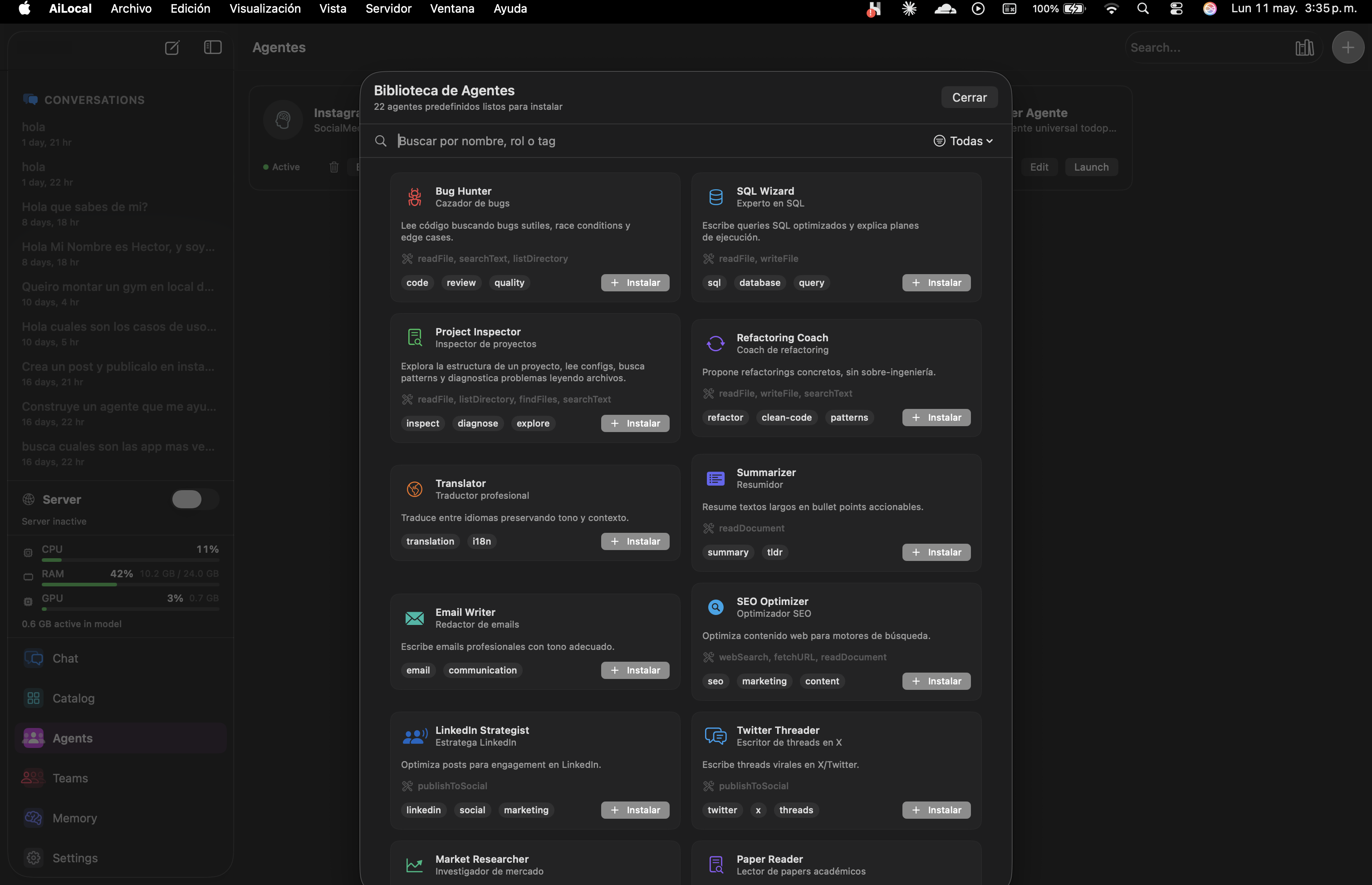
Each agent is a curated prompt + tools + memory + ideal-model preset. Tuned for the task. Editable. Composable into Teams.
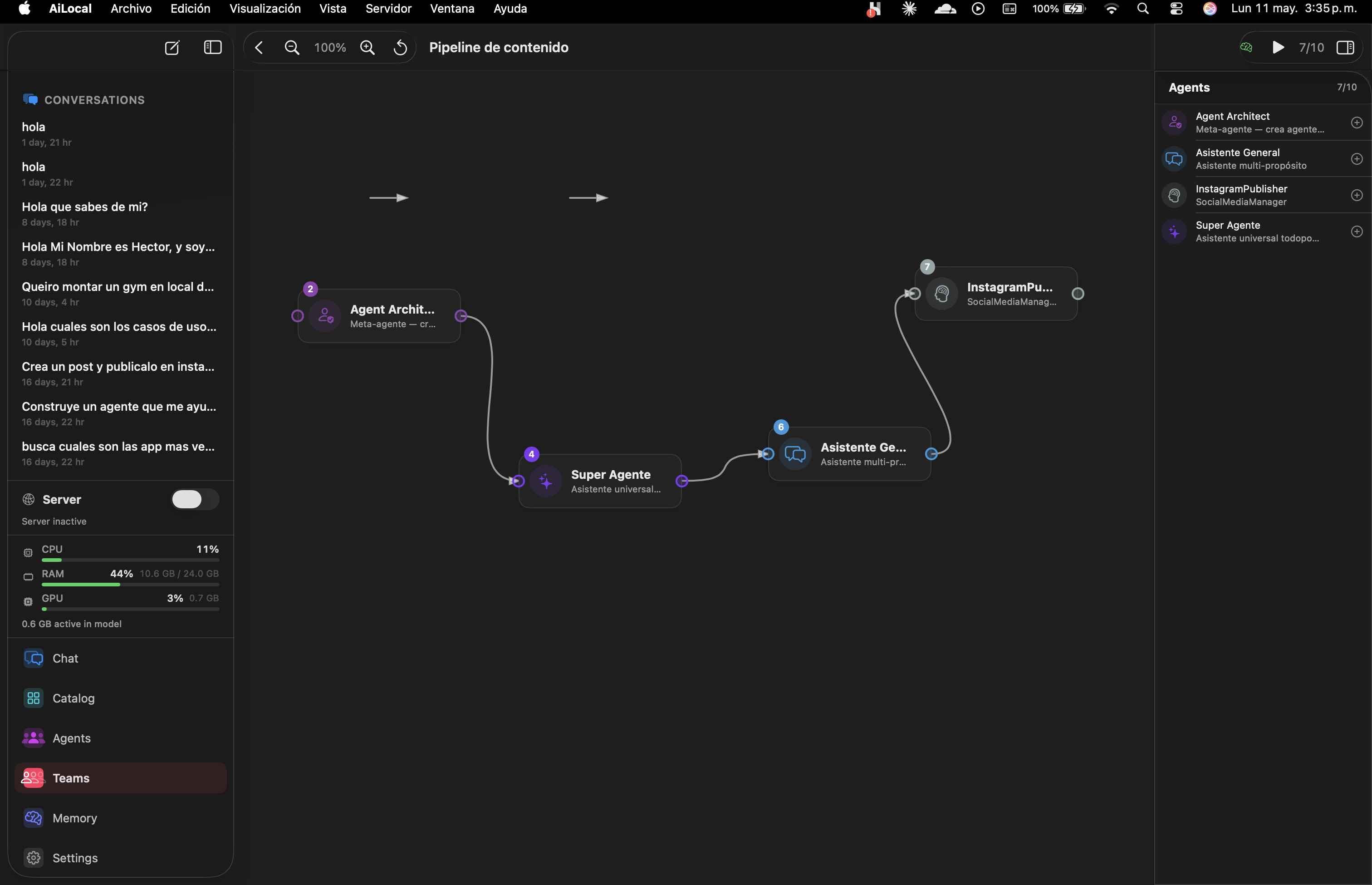
Drag agents onto a canvas. Connect their outputs. Run the whole graph with one click. Built-in templates for content, code review, research.
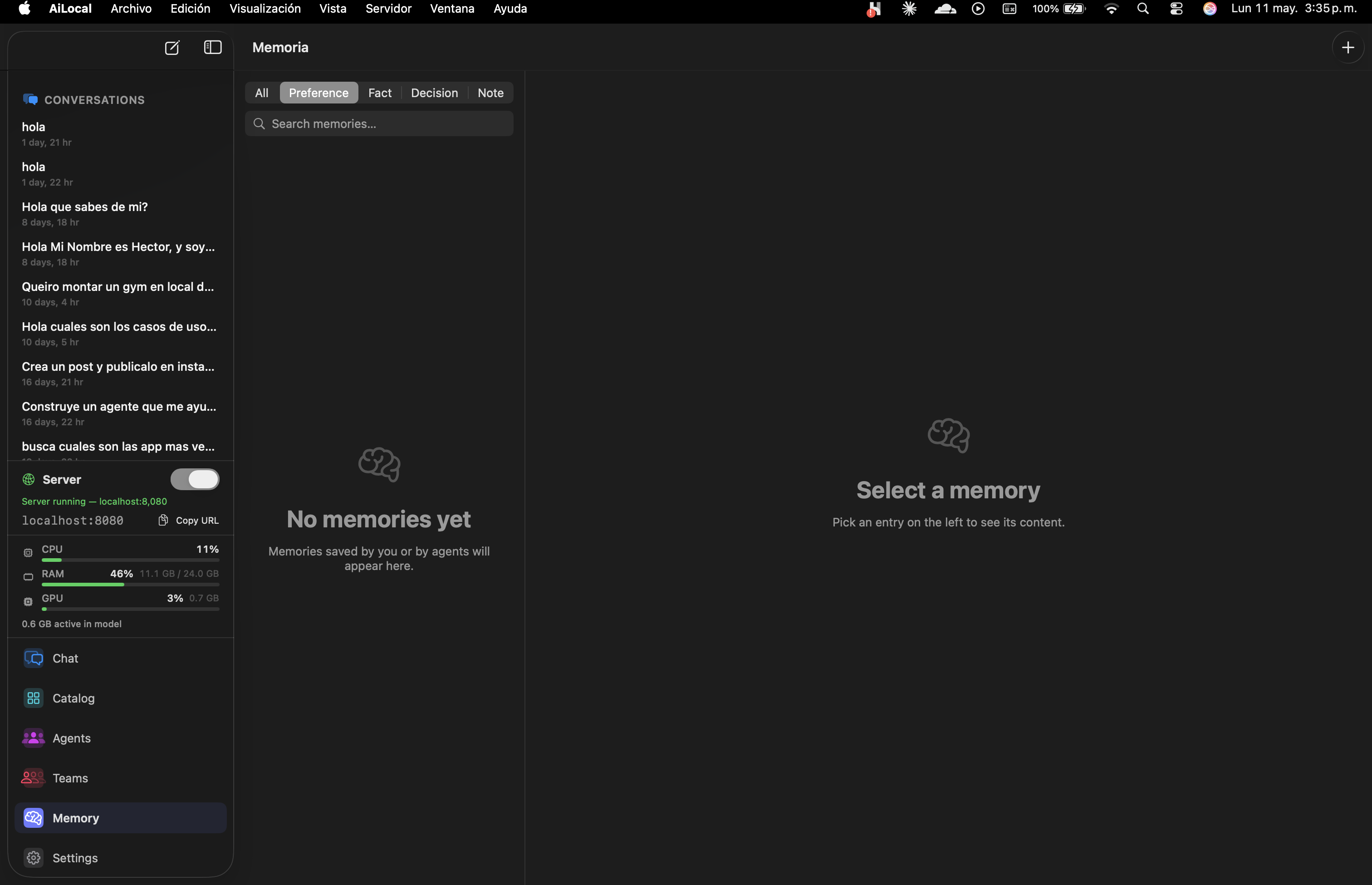
Long-term memory stored as Preferences, Facts, Decisions, or Notes. Per-agent. Searchable. Never synced.
Browse your locally-stored models or search the HuggingFace Hub directly inside the app. Every model is MLX-quantized for Apple Silicon — download, click Run, done. No terminals, no python, no waiting on conversions.
We index thousands of MLX-quantized weights. No conversion step. No CUDA. Just download-and-go on M-series silicon.
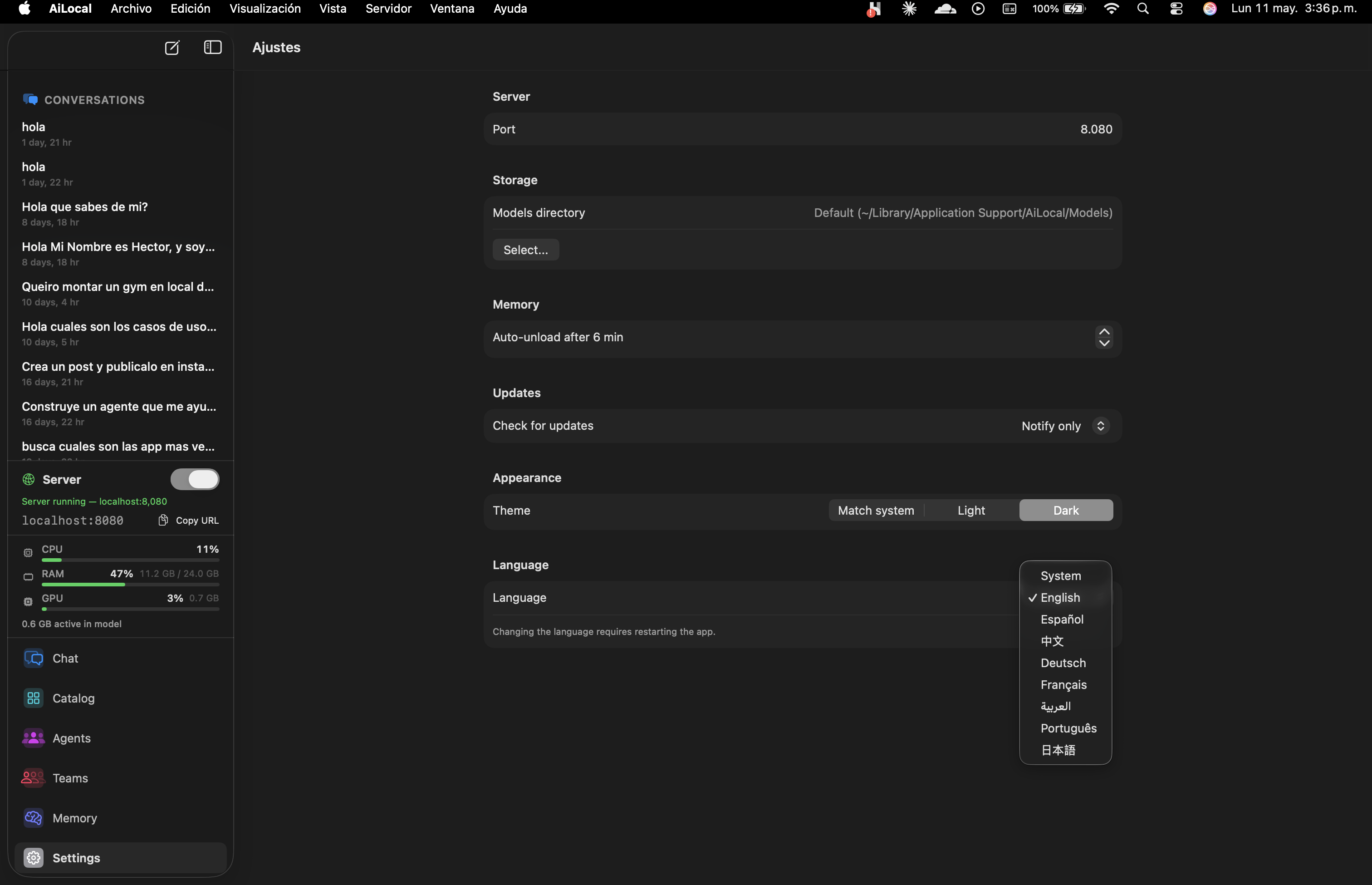
Auto-unload after N minutes of inactivity. The model evicts itself from unified memory so the rest of your Mac stays snappy. Configurable per-session.
Curated prompts, tool wiring, and ideal-model presets — all editable in plain Markdown. Open the library, click Install, start working. No prompt engineering required.
Reads code looking for subtle bugs, race conditions, edge cases.
Writes optimized SQL queries and explains execution plans.
Explores project structure, reads configs, diagnoses issues.
Proposes targeted refactorings without over-engineering.
PR-grade review with security focus and style consistency.
Generates API docs and inline comments from signatures.
Translates between languages preserving tone and context.
Condenses long text into actionable bullet points.
Tone shifts, grammar, clarity. Your voice, sharpened.
Drafts professional emails in the right tone.
Audits and rewrites web content for search intent.
Crafts posts tuned for LinkedIn engagement.
Writes viral-shaped threads in X/Twitter format.
Investigates markets, competitors, trends.
Synthesizes across multiple documents. Cites sources.
Reads academic papers and extracts the contributions.
Transcripts in — decisions + action items + speakers out.
Drop a CSV. Get charts, anomalies, plain-English insights.
Vision-model alt text and image descriptions.
Scans text for PII before you paste it anywhere.
Sorts inbox by urgency and proposes 1-line responses.
A meta-agent that helps you build new agents from a description.
Plus a built-in Markdown editor and Agent Architect (the meta-agent) to compose your own.
Drag agents onto a canvas. Connect their outputs. Save the team. Run the whole graph whenever you need that output. No scripting unless you want to.
Templates ship with the app. Customize them, save your own, or share JSON with a teammate.
Things you tell the model should stick — but stay organized. AiLocally splits memory into four categories so the right context surfaces at the right moment. All on-device, searchable, and yours to wipe with one click.
How you like answers framed. Tone. Verbosity. Naming conventions.
Stable truths about you, your projects, your stack, your codebase.
Choices already made that future answers should respect.
Anything else worth surfacing later. Free-form context.
Written in Swift. Powered by MLX. Apple Silicon's unified memory architecture means models never copy weights between CPU and GPU — every token is generated at maximum bandwidth.
Benchmarks on macOS 15.4, 64GB unified memory, room-temperature ambient. Models loaded from local SSD. Results vary by ±10% per run.
Cloud AI promised convenience. It delivered surveillance, lock-in, and rented intelligence. We took the other path.
Every prompt, every conversation, every memory is processed on-device. We have no servers to leak.
Open Activity Monitor while AiLocally runs. You will see zero outbound calls. Verifiable.
You install the app. You use it. That is the entire data flow.
localhost:8080.
Same endpoints. Same request format. Same streaming semantics as api.openai.com.
Flip the toggle in Settings and every tool that speaks OpenAI just works — pointed at your Mac.
curl http://localhost:8080/v1/chat/completions \
  -H "Content-Type: application/json" \
  -d '{
    "model": "llama-3.3-70b-instruct",
    "messages": [
      {"role": "user", "content": "Summarize this PR diff."}
    ],
    "stream": true
}'from openai import OpenAI
client = OpenAI(
base_url="http://localhost:8080/v1",
api_key="not-needed" # local, no auth
)
stream = client.chat.completions.create(
model="llama-3.3-70b-instruct",
messages=[{"role": "user", "content": "Summarize this PR diff."}],
stream=True,
)
for chunk in stream:
print(chunk.choices[0].delta.content or "", end="")import OpenAI from "openai";
const client = new OpenAI({
baseURL: "http://localhost:8080/v1",
apiKey: "not-needed",
});
const stream = await client.chat.completions.create({
model: "llama-3.3-70b-instruct",
messages: [{ role: "user", content: "Summarize this PR diff." }],
stream: true,
});
for await (const chunk of stream) {
process.stdout.write(chunk.choices[0]?.delta?.content ?? "");
}let url = URL(string: "http://localhost:8080/v1/chat/completions")!
var request = URLRequest(url: url)
request.httpMethod = "POST"
request.setValue("application/json", forHTTPHeaderField: "Content-Type")
request.httpBody = try JSONEncoder().encode([
"model": "llama-3.3-70b-instruct",
"messages": [["role": "user", "content": "Summarize this PR diff."]],
"stream": true
])
let (bytes, _) = try await URLSession.shared.bytes(for: request)
for try await line in bytes.lines {
print(line)
}Drop-in replacement — works with everything that speaks OpenAI
The technical choices most people will never notice — and the ones the discerning ones will.
No Electron. No wrappers. Written in Swift for Apple Silicon from the first line.
Apple's ML stack. Unified memory. No CPU-GPU copies. Hardware-rate token generation.
localhost:8080/v1 — drop in for Cursor, Continue, Aider, LangChain, anything else.
Long-term context split across Preference, Fact, Decision, Note. Searchable. Yours.
CPU, RAM, GPU and active-model footprint visible in the sidebar at all times.
Inactive models evict themselves from unified memory. The rest of your Mac stays snappy.
English · Español · 中文 · Deutsch · Français · العربية · Português · 日本語.
Industry-standard Mac update framework. Signed releases, cryptographically verified.
If you just want a CLI to run a model, Ollama is great. If you don't mind your data in the cloud, ChatGPT works. AiLocally is for engineers shipping with the OpenAI SDK who can't send data out — and the teams that need one shared local server, not five rogue installs.
| Feature | AiLocally | LM Studio | Ollama | ChatGPT Plus | Cloud API |
|---|---|---|---|---|---|
| 100% local No prompt ever leaves your machine | |||||
| Native Mac app Not Electron. Not a browser tab. | Partial | Partial | |||
| Built-in agents Curated, ready to use | 12+ | GPTs | |||
| Visual pipelines Chain agents in a graph | |||||
| OpenAI-compatible API Cursor, Continue, Aider work out of box | |||||
| Team sharing One Mac, multiple seats, shared endpoint | Partial | ||||
| MLX-native speed Unified-memory optimized | Partial | n/a | n/a | ||
| Conversation memory Persistent, per-agent | |||||
| Pricing One-time vs subscription | $49 once | Free | Free | $20/mo | Pay-per-token |
Comparison reflects feature scopes as of mid-2026. Competitors are great products — pick the one that fits your workflow.
One purchase. Every Mac you own. Every future update. We bet on the product, not on your wallet.
Founder's pricing. Same product as Personal, locked in forever.
lifetime · first 500 only
For solo devs and creators who want OpenAI-grade AI — without the cloud bill or the data leak.
lifetime · one-time
Turn one Mac into your team's private AI server. 3 seats, one license, zero IT tickets.
lifetime · 3 seats · one-time
30-day money back guarantee · No questions asked · Pay with crypto (BTC, ETH, USDT, and 300+ more)
Did not see your question? Email hello@ai-locally.com .